
Usage Tutorial#
Once everything has been installed and synced, you can follow this tutorial on querying the graph directly.
View the Neo4j web interface at http://localhost:7474. You can view the reference on this here.
If you already know Neo4j and just need to know what are the nodes, attributes, and graph relationships for our representation of infrastructure assets, you can view our sample queries. More sample queries are available at https://github.com/marco-lancini/cartography-queries.
Otherwise, read on for this handhold-y tutorial filled with examples. Suppose we wanted to find out:
What RDS instances are installed in my AWS accounts?#
MATCH (aws:AWSAccount)-[r:RESOURCE]->(rds:AWSRDSInstance)
return *
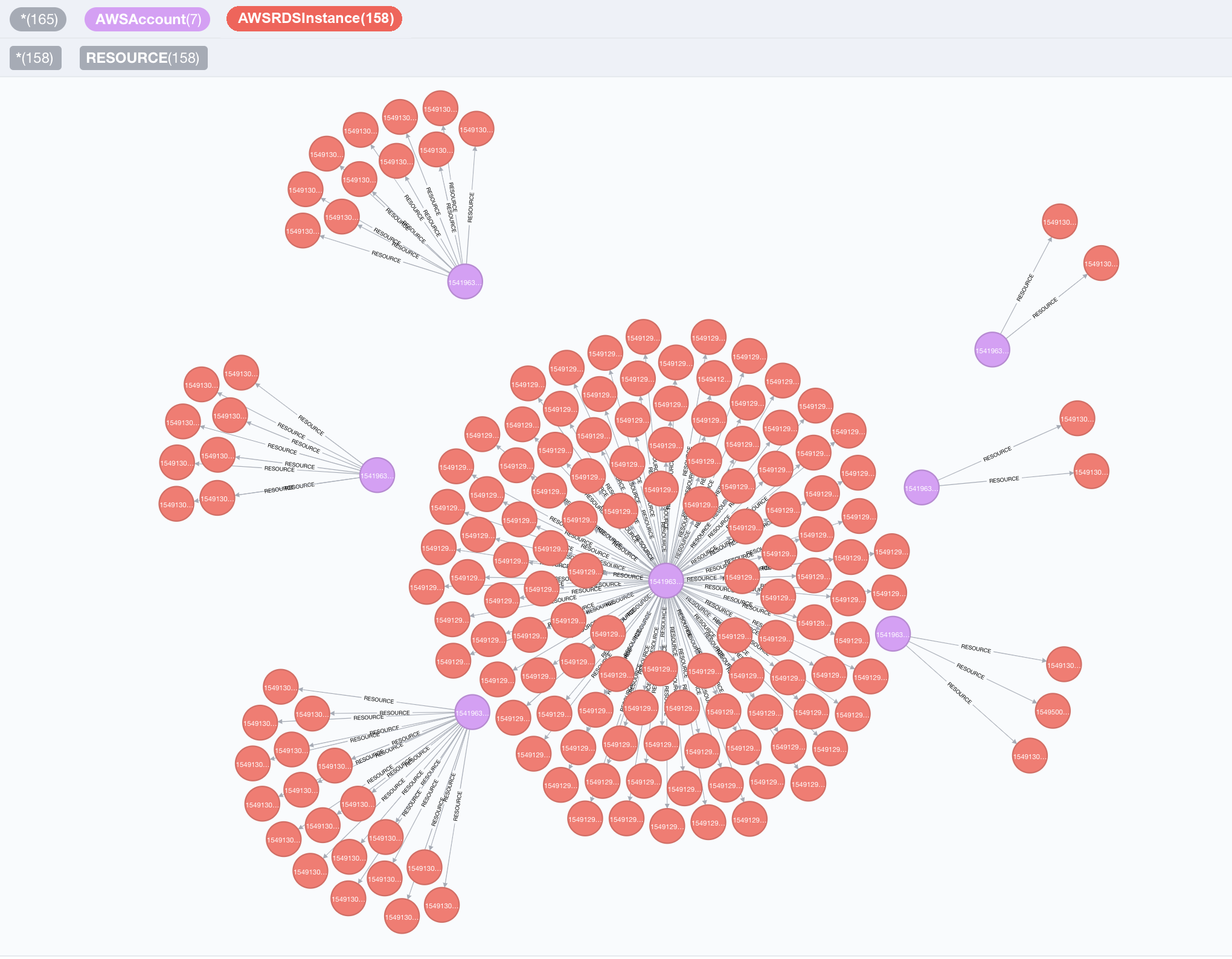
In this query we asked Neo4j to find all [:RESOURCE] relationships from AWSAccounts to RDSInstances, and return the nodes and the :RESOURCE relationships.
We will do more interesting things with this result next.
ℹ️ Protip - customizing your view#
You can adjust the node colors, sizes, and captions by clicking on the node type at the top of the query. For example, to change the color of an AWSAccount node, first click the “AWSAccount” icon at the top of the view to select the node type
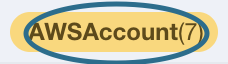
and then pick options on the menu that shows up at the bottom of the view like this:

Which RDS instances have encryption turned off?#
MATCH (a:AWSAccount)-[:RESOURCE]->(rds:AWSRDSInstance{storage_encrypted:false})
RETURN a.name, rds.id
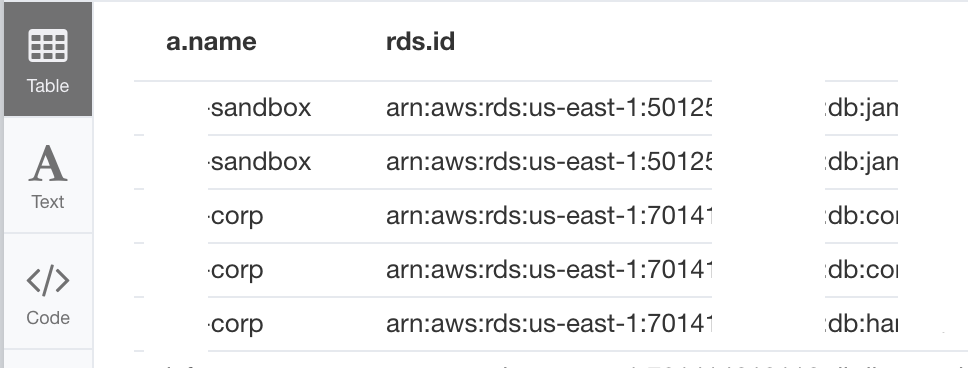
The results show up in a table because we specified attributes like a.name and rds.id in our return statement (as opposed to having it return *). We used the “{}” notation to have the query only return RDSInstances where storage_encrypted is set to False.
If you want to go back to viewing the graph and not a table, simply make sure you don’t have any attributes in your return statement – use return * to return all nodes decorated with a variable label in your MATCH statement, or just return the specific nodes and relationships that you want.
Let’s look at some other AWS assets now.
Which EC2 instances are directly exposed to the internet?#
MATCH (instance:AWSEC2Instance{exposed_internet: true})
RETURN instance.instanceid, instance.publicdnsname
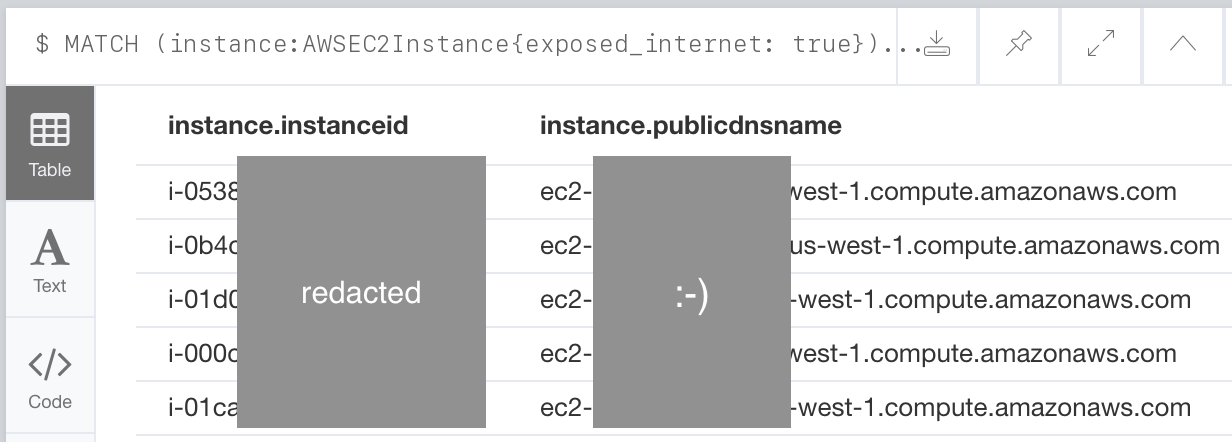
These instances are open to the internet either through permissive inbound IP permissions defined on their EC2SecurityGroups or their NetworkInterfaces.
If you know a lot about AWS, you may have noticed that EC2 instances don’t actually have an exposed_internet field. We’re able to query for this because Cartography performs some data enrichment to add this field to AWSEC2Instance nodes.
Which S3 buckets have a policy granting any level of anonymous access to the bucket?#
MATCH (s:AWSS3Bucket)
WHERE s.anonymous_access = true
RETURN s
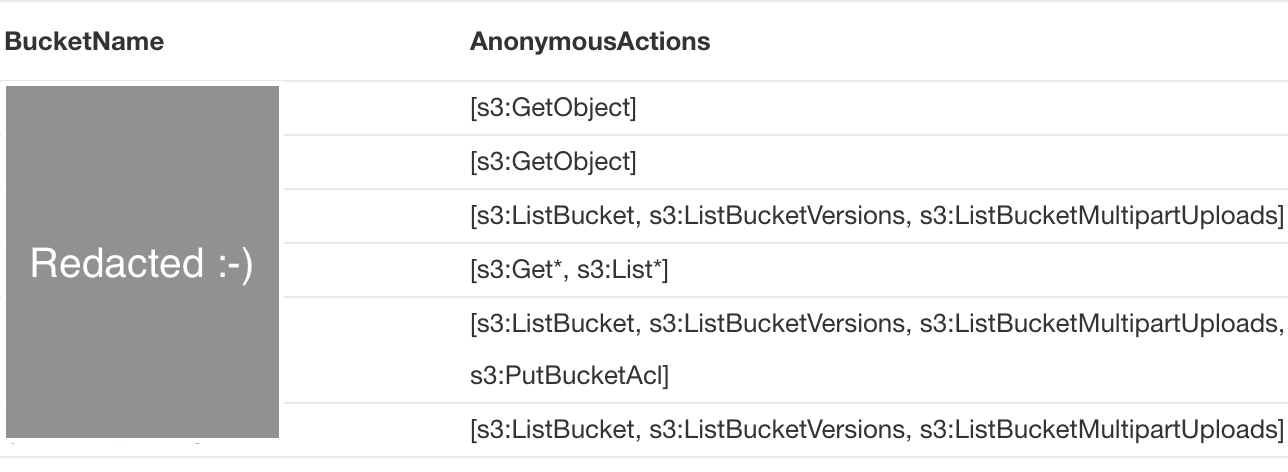
These S3 buckets allow for any user to read data from them anonymously. Similar to the EC2 instance example above, S3 buckets returned by the S3 API don’t actually have an anonymous_access field and this field is added by one of Cartography’s data augmentation steps.
A couple of other things to notice: instead of using the “{}” notation to filter for anonymous buckets, we can use SQL-style WHERE clauses. Also, we used the SQL-style AS operator to relabel our output header rows.
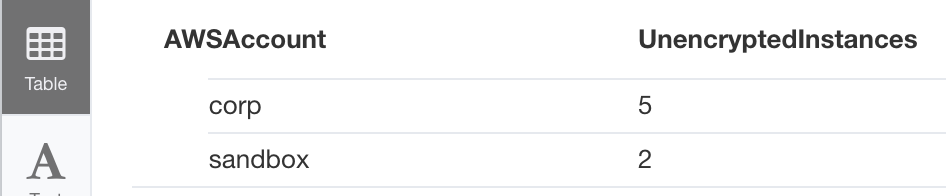
How many unencrypted RDS instances do I have in all my AWS accounts?#
Let’s go back to analyzing RDS instances. In an earlier example we queried for RDS instances that have encryption turned off. We can aggregate this data by AWSAccount with a small change:
MATCH (a:AWSAccount)-[:RESOURCE]->(rds:AWSRDSInstance)
WHERE rds.storage_encrypted = false
RETURN a.name as AWSAccount, count(rds) as UnencryptedInstances
Given a node label, what other node labels can be connected to it?#
Suppose we wanted to know what other assets can be connected to a DNSRecord. We would ask the graph like this:
match (d:DNSRecord)--(n)
return distinct labels(n);
This says “what are the possible labels for all nodes connected to all DNSRecord nodes d in my graph?” Your answer might look like this:
["AWSDNSRecord", "DNSRecord"]
["AWSDNSZone", "DNSZone"]
["AWSLoadBalancerV2"]
["AWSNameServer"]
["AWSESDomain"]
["LoadBalancer"]
["AWSEC2Instance", "Instance"]
You can then make the path more specific like this:
match (d:DNSRecord)--(:AWSEC2Instance)--(n)
return distinct labels(n);
And then you can continue building your query.
We also include full schema docs, but this way of building a query can be faster and more interactive.
Given a node label, what are the possible property names defined on it?#
We can find what properties are available on an AWSS3Bucket like this:
match (n:AWSS3Bucket) return properties(n) limit 1;
The result will look like this:
{
  "bucket_key_enabled": false,
  "creationdate": "2022-05-10 00:22:52+00:00",
  "ignore_public_acls": true,
  "anonymous_access": false,
  "firstseen": 1652400141863,
  "block_public_policy": true,
  "versioning_status": "Enabled",
  "block_public_acls": true,
  "anonymous_actions": [],
  "name": "my-fake-bucket-123",
  "lastupdated": 1688605272,
  "encryption_algorithm": "AES256",
  "default_encryption": true,
  "id": "my-fake-bucket-123",
  "arn": "arn:aws:s3:::my-fake-bucket-123",
  "restrict_public_buckets": false
}
Our full schema docs describe all possible fields, but listing out properties this way lets you avoid switching between browser tabs.
Learning more#
If you want to learn more in depth about Neo4j and Cypher queries you can look at this tutorial and see this reference card.
Data Enrichment#
Cartography adds custom attributes to nodes and relationships to point out security-related items of interest. Built-in data augmentation jobs are typed analysis jobs under cartography/analysis/*/analysis.py. Here is a summary of all of Cartography’s custom attributes.
exposed_internetindicates whether the asset is accessible to the public internet.
The exposure contract#
Any module that computes internet exposure must follow the same contract, so that a cross-provider query means the same thing everywhere.
exposed_internetis a boolean.Truemeans the asset is reachable from the public internet. A module should also run a final pass setting it toFalseon the assets it evaluated but did not find exposed, so thatWHERE n.exposed_internet = falseis answerable and not confused with “never evaluated”.exposed_internet_typeis a list of strings recording how the asset is exposed. Values in use today:direct(the asset itself has a public address or an open ingress rule),lb,elb,elbv2,gcp_lb(reached through a load balancer of that kind),pat(reached through a Scaleway Public Gateway port-address-translation rule), andtcp_proxy(a raw port published with no TLS termination, as Railway does). Append withAddToSetrather than overwriting, since an asset can be exposed several ways at once.The
EXPOSErelationship always runs from the internet-facing frontend to the asset it puts at risk, never the reverse:(:AWSLoadBalancerV2)-[:EXPOSE]->(:AWSEC2Instance). The frontend is the means of exposure; the target is what is at risk. This direction is enforced for ontology-labelled endpoints byONTOLOGY_REL_CONSTRAINTS. An optionalexposure_typeproperty on the edge records the path (via_lb_only,gcp_lb).Declare both properties on the node schema with
extra_index=Trueand a description explaining the derivation, so they are indexed and appear in the generated schema docs.
Exposure is normally computed by a typed analysis job, because it depends on paths across
several node types. When the signal is entirely local to one API response, computing it in
transform() is fine and preferred: cartography.intel.aws.apigateway and
cartography.intel.aws.elasticsearch both do this.
Note that “the internet” is not a node. It is modelled as the 0.0.0.0/0 range:
(:AWSIpRange {range: '0.0.0.0/0'}), (:GCPIpRange {id: '0.0.0.0/0'}), or on Azure a
source_address_prefix of *, Internet or 0.0.0.0/0.
Per-resource derivations#
Modules writing exposed_internet today: AWS, GCP, Azure, Kubernetes, Scaleway,
Railway, Modal, Netlify, Supabase, Cloudflare and Vercel. AWS and
Kubernetes do not yet run the explicit False pass described above, so on those providers a
missing property means “not found exposed” rather than a stored false.
- **Elastic Load Balancers**: The `exposed_internet` flag is set to `True` when the load balancer's `scheme` field is set to `internet-facing`, and the load balancer has an attached source security group with rules allowing `0.0.0.0/0` ingress on ports or port ranges matching listeners on the load balancer. This scheme indicates that the load balancer has a public DNS name that resolves to a public IP address.

- **Application Load Balancers**: The `exposed_internet` flag is set to `True` when the load balancer's `scheme` field is set to `internet-facing`, and the load balancer has an attached security group with rules allowing `0.0.0.0/0` ingress on ports or port ranges matching listeners on the load balancer. This scheme indicates that the load balancer has a public DNS name that resolves to a public IP address.

- **EC2 instances**: The `exposed_internet` flag on an EC2 instance is set to `True` when any of following apply:

	- The instance is part of an EC2 security group or is connected to a network interface connected to an EC2 security group that allows connectivity from the 0.0.0.0/0 subnet.

	- The instance is connected to an Elastic Load Balancer that has its own `exposed_internet` flag set to `True`.

	- The instance is connected to a TargetGroup which is attached to a Listener on an Application Load Balancer (elbv2) that has its own `exposed_internet` flag set to `True`.

- **ElasticSearch domain**: `exposed_internet` is set to `True` if the ElasticSearch domain has a policy applied to it that makes it internet-accessible. This policy determination is made by using the [policyuniverse](https://github.com/Netflix-Skunkworks/policyuniverse) library. The code for this augmentation is implemented at `cartography.intel.aws.elasticsearch._is_internet_exposed()`.

- **API Gateway REST APIs**: `exposed_internet` is set to `True` when the API's endpoint configuration type is `EDGE` or `REGIONAL`, both of which are publicly resolvable. Computed in `transform()` at `cartography.intel.aws.apigateway`.

- **EKS / GKE clusters**: `exposed_internet` is set to `True` when the cluster's control plane endpoint has public access enabled. AKS is not covered: `AzureKubernetesCluster` stores `api_server_public_access` but no job turns it into a verdict, and the ontology's `_ont_control_plane_public_access` is what the `kubernetes_control_plane_exposed` rule reads for it instead.

- **GCP instances**: `exposed_internet` is set to `True` when the instance has an access config granting it an external IP, or when it is reached through an exposed forwarding rule. GCP firewall deny rules are evaluated by priority, so a higher-priority deny suppresses a lower-priority allow.

- **GCP forwarding rules**: `exposed_internet` is set to `True` when the rule's load balancing scheme is external.

- **Cloud Run services**: `exposed_internet` is set to `True` when ingress is `INGRESS_TRAFFIC_ALL`, and to `False` for `INGRESS_TRAFFIC_INTERNAL_ONLY` and `INGRESS_TRAFFIC_NONE`.

- **Azure virtual machines**: `exposed_internet` is set to `True` when a network interface on the VM is associated with a public IP address, or when the VM sits behind an Azure load balancer that is itself exposed.

- **Azure load balancers and container groups**: `exposed_internet` is set to `True` when the resource has a public frontend IP configuration.

- **Kubernetes services, pods and containers**: `exposed_internet` is set to `True` on a service fronted by an internet-facing load balancer, then propagated down to the pods the service targets and to the containers inside those pods. Note this currently only recognises AWS load balancers.
anonymous_accessindicates whether the asset allows access without needing to specify an identity.S3 buckets: Two independent paths can set
anonymous_accessandanonymous_actions. The ACL analysis directly matchesAWSS3Aclrecords whose URI names the predefined AWS “Authenticated Users” or “All Users” groups, then maps the ACL permission to S3 actions. Bucket policies are evaluated separately with the policyuniverse library.
Extending Cartography with Analysis Jobs#
You can add your own custom attributes and relationships without writing Python code! Here’s how.
Mapping AWS Access Permissions#
Cartography can map permissions between IAM Principals and resources in the graph. Here’s how.
Permalinking Bookmarklet#
You can set up a bookmarklet that lets you quickly get a permalink to a Cartography query. To do so, add a bookmark with the following contents as the URL - make sure to replace neo4j.contoso.com:7474 with your instance of Neo4j:
javascript:(() => { const query = document.querySelectorAll('article label span')[0].innerText; if (query === ':server connect') { console.log('no query has been run!'); return; } const searchParams = new URLSearchParams(); searchParams.append('connectURL', 'bolt://neo4j:neo4j@neo4j.contoso.net:7687'); searchParams.append('cmd', 'edit'); searchParams.append('arg', query.replaceAll(/\r /g, '\r')); newURL = `http://neo4j.contoso.net:7474/browser/?${searchParams}`; window.open(newURL, '_blank', 'noopener'); })()
Then, any time you are in the web interface, you can click the bookmarklet to open a new tab with a permalink to your most recently executed query in the URL bar.